Archive for the 'Python' Category

Python for S60: back in the saddle

I had the opportunity to meet Jürgen Scheible and Ville Tuulos, authors of the Mobile Python book at PyCon a few weeks ago. They graciously gave me a copy of their book, which is an absolutely fantastic guide to writing S60 apps in Python. It seems like every time I look away from Python for S60 it gets better, and this time was no exception. Everything is just a little more polished, a few more APIs are supported (yay sensor API!), and the community and learning materials available have grown tremendously.

While I didn’t get a chance to hang out too long during the sprints, I did pull together some code for a concept I’ve wanted to do for a long time: a limpet webcam that I can stick on something and watch it ride around the city. Specifically I thought it would be cool to attach one to a city bus and upload pictures while tracing its movements.

So here’s my quick 19 line prototype that simply takes a picture using the camera API and uploads the saved photo using ftplib copied over from the Python 2.2.2 standard library. It’s called webcam.py. I haven’t run it since PyCon, so the most recent photo is from the PyS60 intro session.

Working with PyS60 again was absolutely refreshing. I write Python code (using Django) at work but writing code for a mobile device again got the creative juices flowing. I’m trying to do more with less in my spare time, but I definitely need to make more time for PyS60 in my life.

PyCon 2008

I’m headed out the door to PyCon 2008. Yay!

Covering Kansas Democratic Caucus Results

I think we’re about ready for caucus results to start coming in.

We’re covering the Caucus results at LJWorld.com and on Twitter.

Turnout is extremely heavy. So much so that they had to split one of the caucus sites in two because the venue was full.

Later…

How did we do it?

We gained access to the media results page from the Kansas Democratic Party on Friday afternoon. On Sunday night I started writing a scraper/importer using BeautifulSoup and rouging out the Django models to represent the caucus data. I spent Monday refining the models, helper functions, and front-end hooks that our designers would need to visualize the data. Monday night and in to Tuesday morning was spent finishing off the importer script, exploring Google Charts, and making sure that Ben and Christian had everything they needed.

After a few hours of sleep, most of the morning was spent testing everything out on our staging server, fixing bugs, and improving performance. By early afternon Ben was wrapping up KTKA and Christian was still tweaking his design in Photoshop. Somewhere between 1 and 2 p.m. he started coding it up and pretty soon we had our results page running on test data on the staging server.

While the designers were finishing up I turned my focus to the planned Twitter feed. Thanks to some handy wrappers from James, I wrote a quick script that generated a short message based on the caucus results we had, compared it to the last version of the message, and sent a post to Twitter if the message had changed.

Once results started coming in, we activated our coverage. After fixing one quick bug, I’ve been spending most of the evening watching importers feed data in to our databases and watching the twitter script send out updates. Because we’ve been scraping the Kansas Democratic Party media results all night and showing them immediately, we’ve been picking up caucuses seconds after they’ve been reported and have been ahead of everything else I’ve looked at.

Because we just recently finished moving our various Kansas Weekly papers to Ellington and a unified set of templates, it was quite trivial to include detailed election results on the websites for The Lansing Current, Baldwin City Signal, Basehor Sentinel, The Chieftain, The De Soto Explorer, The Eudora News, Shawnee Dispatch, and The Tonganoxie Mirror

While there are definitely things we could have done better as a news organization (there always are), I’m quite pleased at what we’ve done tonight. Our servers hummed along quite nicely all night, we got information to our audience as quickly as possible, and generally things went quite smoothly. Many thanks to everyone involved.

We’re hiring!

Wow, the Django job market is heating up. I posted a job opening for both junior and senior-level Django developers on djangogigs just a few days ago, and it has already fallen off the front page.

So I’ll mention it again: We’re hiring! We’re growing and we have several positions open at both the junior and senior level. We’d love to talk to you if you’ve been working with Django since back in the day when everything was a tuple. We’d love to talk to you if you’re smart and talented but don’t have a lot of (or any) Django experience.

Definitely check out the listing at djangogigs for more, or feel free to drop me a line if you’d like to know more.

2008 Digital Edge Award Finalists

The 2008 DIgital Edge Award finalists were just announced, and I’m excited to see several World Company sites and projects on there as well as a couple of sites running Ellington and even the absolutely awesome Django-powered PolitiFact.com.

At work we don’t do what we do for awards. We do it to serve our readers, tell a story, get information out there, and do it as best we can. At the same time even being nominated as finalists is quite an honor, and evokes warm fuzzy feelings in this programmer.

Here are the various World Company projects and sites that were nominated (in the less than 75,000 circulation category):

Not too shabby for a little media company in Kansas. I’m particularly excited about the LJWorld.com nominations since it hasn’t been too long since we re-designed and re-launched the site with a lot of new functionality. Scanning the finalists I also see a couple of other sites running Ellington as well as several special projects by those sites.

As someone who writes software for news organizations for a living I’m definitely going to take some time this morning to take a look at the other finalists. I’m particularly excited to check out projects from names that I’m not familiar with.

Reason 3,287 why I hate setuptools

root@monkey:~/inst/simplejson# python setup.py install
The required version of setuptools (>=0.6c6) is not available, and
can't be installed while this script is running. Please install
 a more recent version first.

(Currently using setuptools 0.6c3 
(/usr/lib/python2.4/site-packages/setuptools-0.6c3-py2.4.egg))

Darwin Calendar Server Status Update

Wilfredo Sánchez Vega posted an update on the status of Darwin Calendar Server to the calenderserver-dev mailing list this afternoon with a status update on the project. Check the full post for details, but here’s the takeaway:

We think the server’s in pretty solid shape right now. Certainly there are still some bugs that have to be fixed before we can roll up a “1.0″ release, but the core functionality is all in place now, and we think it’s fairly useable in its current state.

There is also a preview release in the works, so keep a close eye on the mailing list and the Darwin Calendar Server site.

Properly serving a 404 with lighttpd’s server.error-handler-404

The other day I was looking in to why Django’s verify_exists validator wasn’t working on a URLField. It turns out that the 404 handler that we were using to generate thumbnails with lighttpd on the media server was serving up 404 error pages with HTTP/1.1 200 OK as the status code. Django’s validator was seeing the 200 OK and (rightfully) not raising a validation error, even though there was nothing at that location.

It took more than the usual amount of digging to find the solution to this, so I’m making sure to write about it so that I can google for it again when it happens to me next year. The server.error-hadler-404 documentation metnions that to send a 404 response you will need to use server.errorfile-prefix. That doesn’t help me a lot since I needed to retain the dynamic 404 handler.

Amusingly enough, the solution is quite clear once you dig in to the source code. I dug through connections.c and found that if I sent back a Status: line, that would be forwarded on by lighttpd to the client (exactly what I wanted!)

Here’s the solution (in Python) but it should translate to any language that you’re using as a 404 handler:

print "Status: 404"
print "Content-type: text/html"
print
print # (X)HTML error response goes here

I hope this helps, as I’m sure it will help me again some time in the future.

Nokia N800 and camera.py

Nokia N800 and camera.py

I received my Nokia N800 yesterday and have been enjoying how zippy it is compared to the 770 (which has been getting faster with every firmware upgrade).. I got a chance to play with the browser while waiting for my wife at the airport and have been poking around to see how Bora is different than Mistral and Scirocco.

One of the bigger physical differences between the 770 an N800 is the onboard camera. I haven’t set up Nokia Internet Call Invitation yet but I looked around for some camera code samples and was pleasantly suprised. Luckily Nokia is one step ahead of me with camera.py, an example program to show what the camera sees on the screen. It looks like some bindings are missing so saving an image from the camera is off limits at the moment but this is a great start.

To run the above example on your N800, grab camera.py, install Python and osso-xterm, and run camera.py from the console.

It’s time to dust off the Python Maemo tutorial and get my feet wet.

Update: I’ve also been playing with the c version of the camera example code and have managed to get it running and taking pictures after building it in scratchbox and running it with run-standalone.sh ./camera.

Mapping Every airport and helipad in America

All the airports

After stumbling upon Transtats again today I took my semi-anual visit to the FAA data and statistics page to see if there was anything new to play with. The unruly passenger count still looks like it’s down for 2006 but I was really interested in playing with the airport data that I’ve seen before.

After a little help from Python’s CSV module and some helper functions from geopy, I whipped up a 4 meg KML file for use with Google Earth or anything else that can import KML. Be warned thought that the file contains some 20,000 airports, helipads, and patches of dirt that can lead to some rendering bugs. If you’re interested, here’s the code that generated the KML.

Arduino serial communication with Python

The Arduino is here!

I got my shiny Arduino yesterday. The first order of business (after the obligatory “Hello World” led_blink sketch) was interfacing Arduino with my language of choice, Python.

Googling around for python serial led me to pySerial, a cross-platform serial library. I was actually quite suprised that such a wrapper didn’t exist in the Python Standard Library. Nevertheless, I plodded on.

The first order of business was symlinking the default device for the Arduino serial drivers on my mac (for sanity):
sudo ln -s /dev/tty.usbserial-LOTSOFCHARSANDNUMBERS /dev/tty.usbserial. From there I fired up the Python shell and ran the serial hello world sketch on my Arduino:

>>> import serial
>>> ser = serial.Serial('/dev/tty.usbserial', 9600)
>>> while 1:
...     ser.readline()
'1 Hello world!\r\n'
'2 Hello world!\r\n'
'3 Hello world!\r\n'

Writing from Python to Arduino is simple too. Load serial_read_blink and do the following from Python:

>>> import serial
>>> ser = serial.Serial('/dev/tty.usbserial', 9600)
>>> ser.write('5')

Hooray, it worked! Communicating with the Arduino over serial with Python (just like every other language) is a pretty trivial process.

All I want to do is convert my schema!

I’m working on a django in which I want to store GPS track information in GPX format. The bests way to store that in django is with an XMLField. An XMLField is basically just a TextField with validation via a RELAX NG Compact schema.

There is a schema for GPX. Great! The schema is an XSD though, but that’s okay, it’s a schema for XML so it should be pretty easy to just convert that to RELAX NG compact, right?

Wrong.

I pulled out my handy dandy schema swiss army knife, Trang but was shocked to find out that while it can handle Relax NG (both verbose and compact), DTD, and an XML file as input and even XSD as an output, there was just no way that I was going to be able to coax it to read an XSD. Trang is one of those things (much like Jing that I rely on pretty heavily that hasn’t been updated in years. That scares me a bit, but I keep on using ‘em.

With Trang out of the picture, I struck out with various google searches (which doesn’t happen very often). the conversion section of the RELAX NG website. The first thing that struck my eye was the Sun RELAX NG Converter. Hey, Sun’s got it all figured out. I clicked the link and was somewhat confused when I ended up at their main XML page. I scanned around and even searched the site but was unable to find any useful mention of their converter. A quick google search for sun “relax ng converter” yielded nothing but people talking about how cool it was and a bunch of confused people (just like me) wondering where they could get it.

At this point I was grasping at straws so I pulled up The Internet Archive version of the extinct Sun RELAX NG Converter page. That tipped me off to the fact that I really needed to start tracking down rngconf.jar. A google search turned up several Xdoclet and Maven cvs repositories. I grabbed a copy of the jar but it wouldn’t work without something called Sun Multi-Schema XML Validator.

That’s the phrase that pays, folks.

A search for Sun “Multi-Schema XML Validator” brought me to the java.net project page and included a prominent link to nightly builds of the multi-schema validator as well as nightly builds of rngconv. These nightly builds are a few months old, but I’m not going to pick nits at this point.

After downloading msv.zip and rngconv.zip and making sure all the jars were in the same directory I had the tools I needed to convert the XSD in hand to RELAX NG Compact. First I converted the XSD to RELAX NG Verbose with the following command: java -jar rngconv.jar gpx.xsd > gpxverbose.rng. That yielded the following RELAX NG (very) Verbose schema. Once I had that I could fall back to trusty Trang to do the rest: trang -I rng -O rnc gpxverbose.rng gpx.rng. It errored out on any(lax:##other) so I removed that bit and tried again. After a lot more work than should have been required, I had my RELAX NG Compact schema for GPX.

My experience in finding the right tools to convert XSD to RELAX NG was so absurd that I had to write it up, if only to remind myself where to look when I need to do this again in two years.

Pardon the Dust

Sorry about the short outage there. I finally consolidated the various co-location, shared hosting, and virtual private hosting services that I was consuming every month in to one VPS account. I still have some legacy URLs to do some rewrite magic for, but the archives back to 2002 is here.

Because my new box is very Django-oriented, I am now running Wordpress via PHP5 (FastCGI) and MySQL5 on lighttpd behind perlbal.

One of the things I really enjoyed about the move from Wordpress on Apache with a really gnarly .htaccess file for URL rewriting to lighttpd was the simplicity of it all. Getting Wordpress to “just work” for me on lighttpd was as simple as adding a 404 handler for the site:

server.error-handler-404 = "/index.php?error=404"

Everything should be smoothing out shortly and of course the eventual goal is to move this blog over to Django trunk. I did just that a few months ago but I need to revisit the code, find the importer, and give it a lot of layout love.

Darwin Calendar Server

As soon as Gruber pointed out Darwin Calendar Server I felt like I had to check it out. I’ve played with Darwin Streaming Server in the past and love me some Webkit. I was pleasantly suprised to find that Darwin Calendar Server runs on top of Python and Twisted.

So away I went. I checked out the source and began to poke around. I managed to check out the source before the README was added so I did a fair amount of head scratching and wheel spinning, but it turns out that getting up and running is pretty easy: ./run -s

That sets up the server, downloading and building some prereqs as it goes. I already had some prereqs installed system wide so I can’t guarantee that this works, but I’m pretty sure that it has worked for others. I should take a second to qualify that I’m running OS X 10.4 with Python 2.4 installed. From there I copied over the sample config file (cp ./conf/repository-static.xml ./conf/repository-dev.xml) and immediately started troubleshooting SSL errors. First I installed PyOpenSSL and created a self-signed certificate. That yielded a brand new error: OpenSSL.SSL.Error: [('PEM routines', 'PEM_read_bio', 'no start line'), ('SSL routines', 'SSL_CTX_use_PrivateKey_file', 'PEM lib')]

After doing that and getting some guidance from the folks in #collaboration on freenode I decided to hack away at the plist and disable SSL for now (change SSLEnable to false instead of true). From there I could run the server (./run) and bring up a directory listing my pointing to 127.0.0.1:8008.

Darwin Calendar Server Chandler Setup

From there I subscribed to the example payday calendar and the holiday calendar. It appears that iCal won’t do two-way CalDAV until Leopard, but in the meantime I was able to successfully set up and test Chandler.

This is some absolutely amazing tech in its infancy. I can’t wait to see where this goes and I’m excited that it’s built with tools that I’m familiar with (Python, Twisted, SQLite, iCal). It seems to me like this open source app is but the tip of the iceberg of collaboration features that will be baked in to OS X 10.5 desktop and server.  I would also kill for a mobile device that spoke CalDAV natively so that I can replace my duct taped google calendar to iCal to iSync to 6682 workflow.

Acknowledging the Mobile Web with Django

KTKA breaking news homepageI was reading up on HowToProvideAlternateViewsForMobileDevices on the Rails wiki this morning and couldn’t help but notice how much easier it is to set up a mobile version of a Django site. At World Online we have stripped-down barebones no frills “all we want are the facts ma’am” versions of all of our sites. They prove extremely useful during KU basketball games or when you’re in downtown lawrence and want to know what restaurants are open. Since our mobile sites are just alternate templates on the same views, setup goes something like this:

In main_site.settings:

TEMPLATE_DIRS = (
'/path/to/templates/mainsite.com/',
'/path/to/templates/default/',
)

In mobile_site.settings:

from main_site.settings import *
TEMPLATE_DIRS = (
'/path/to/templates/mobile.mainsite.com/',
'/path/to/templates/default/'
) 

The first line imports all of the settings from your main site. We then overwrite the TEMPLATE_DIRS setting to point to the mobile version of our templates (and fall back to default templates if there isn’t a mobile specific version). Because every app that we write also gets a default template we can have a complete mobile site up and running by creating just one or two mobile base templates.

While Django can’t help you debate internally the “one web” versus “two webs” philosophies, it can definitely help you produce lightweight mobile-friendly content with minimum effort.

PyS60 1.3.8 Released

Python for S60 version 1.3.8, released specifically for S60 3rd Edition is now available for download. See the release notes for more information. Special thanks to Jukka and everyone else for pushing this release out the door just before Finland shuts down for the summer.

Backing Up Flickr Photos with Amazon S3

I love that I now have an Amazon S3 billing page that reads like a really cheap phone or water bill. I think that they’re silently changing the game (again) without telling anyone else. I really like the implications of this magepiebrain post and decided to start using S3 “for real” myself last night.

The first ingredient was James Clarke’s flickr.py. Getting a list of my photos is pretty simple:

import flickr
me = flickr.people_findByUsername("postneo")
photos = flickr.people_getPublicPhotos(me.id)

The second ingredient for getting the job done was a pythonic wrapper around the Amazon example python libraries by Mitch Garnaat called BitBucket. Because it builds on the example libraries, there’s very little error checking, so be careful. Check out Mitch’s site for some example BitBucket usage, it’s pretty slick.

Once I was familiar with both libraries, I put together a little script that finds all of my photos and uploads the original quality image to S3, using the flickr photo ID as the key. Here’s the complete code for flickrbackup.py, all 25 lines of it.

After uploading 160 or so photos to Amazon, I owe them about a penny.

Getting photos back out is really easy too:

>>> import BitBucket
>>> bucket = BitBucket.BitBucket("postneo-flickr")
>>> bucket.keys()
>>> bits = bucket[u'116201243']
>>> bits.to_file("photo.jpg")

Clickable Bylines

Clickable bylines are the new black in online journalism according to this post and related comments at Poynter. I have to admit that I thought that this was the norm rather than the exception, since this had been the case at the Journal-World long before I arrived in Lawrence.

A few days ago Dan asked me how long it would take to whip up per-writer RSS feeds. Thanks to django’s syndication framework the answer was no time at all. Over the next couple of days and with the direction of Dan and David, we tweaked the feeds to include both per-writer and per-photographer feeds. David made it easy to set up search alerts for every time a staff member posted a story. We also updated the staff bio pages to make all of this information easier to get to.

Here is an example from a recent story by Joel Mathis:

in-story byline

If you click on Joel’s name, you’ll be taken to his bio page. If you click on Contact, you’ll be taken directly to his contact form. There’s nothing new there (for us anyway). The new stuff happens on the bio page:

Joel's bio page

The very top of every bio page contains more metainformation than you can shake a stick at. First and foremost is Joel’s number and contact form. After that we have an RSS feed of his latest stories. Following that is the search alert form that allows you to be notified every time Joel posts a story. Since Joel is such a converged guy and takes pictures too, you can check out the latest photos he has taken or subscribe to an RSS feed of those photos. You can also subscribe to that feed as a photocast in the latest iPhoto.

Joel’s bio page also also contains a short biography that makes me want to head up the street to Rudy’s every time I read it. Below the bio and mugshot is a list of recent stories by Joel and a form that lets you quickly search his stories.

I think these tools go well beyond what other news organizations are just beginning to do. At the same time there is always room for improvement, so don’t be suprised if more information is added to these pages.

mobile.kusports.com

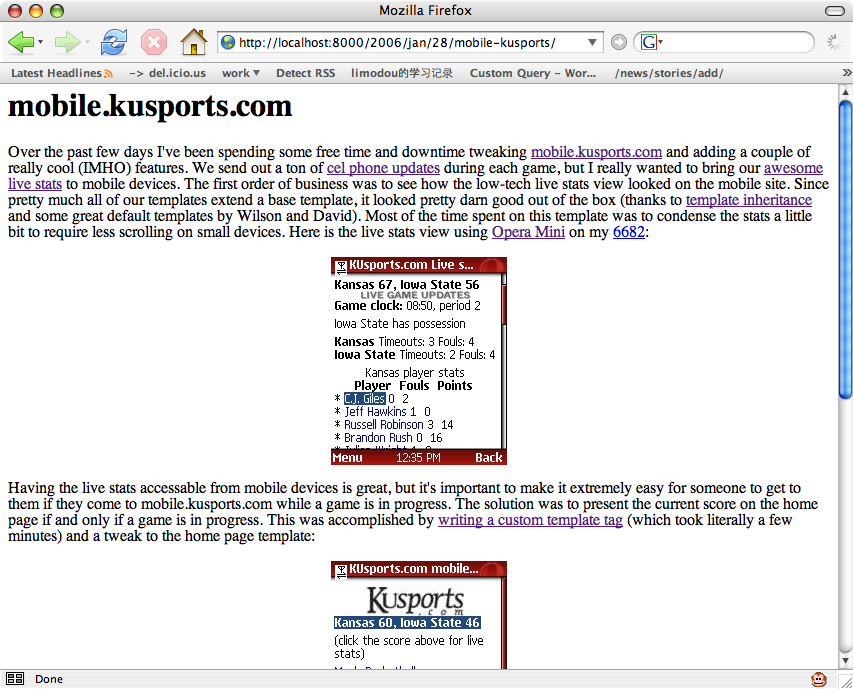
Over the past few days I’ve been spending some free time and downtime tweaking mobile.kusports.com and adding a couple of really cool (IMHO) features. We send out a ton of cel phone updates during each game, but I really wanted to bring our awesome live stats to mobile devices.

The first order of business was to see how the low-tech live stats view looked on the mobile site. Since pretty much all of our templates extend a base template, it looked pretty darn good out of the box (thanks to template inheritance and some great default templates by Wilson and David). Most of the time spent on this template was to condense the stats a little bit to require less scrolling on small devices. Here is the live stats view using Opera Mini on my 6682:

mobile.kusports.com live stats

Having the live stats accessable from mobile devices is great, but it’s important to make it extremely easy for someone to get to them if they come to mobile.kusports.com while a game is in progress. The solution was to present the current score on the home page if and only if a game is in progress. This was accomplished by writing a custom template tag (which took literally a few minutes) and a tweak to the home page template:

KUSports mobile home page

Now the score and the stats are first and foremost while there’s a game on, but nowhere to be found if there isn’t. The last thing I wanted to do was to make sure that the current score (and a link to the live stats) was available from other interior pages in an unobtrusive way. I figure that if someone is reading a story or viewing photos while a game is on, they probably wouldn’t mind knowing the current score either. I decided to present the information without announcing itself quite as loudly as the score on the home page:

KUSports mobile interior page

I hope to do some more tweaking of our mobile sites here and there as free time permits, and I’ll do my best to highlight the changes here if I think they are particularly clever.

We’re Moving to Kansas!

No really, we’re moving to Kansas. I’ve accepted a position at World Online, the online division of the Lawrence Journal-World. I’ll be working on some award winning sites including LJWorld.com, lawrence.com, KUsports.com using my favorite web framework: Django.

I’m really excited about working with an awesome team of people doing some really cool stuff. And of course I’m completely stoked about working with Django on a daily basis. I’ll talk about what I’m up to when I can but there will be times when I have to keep my lips zipped. I guess now might be a good time to mention that this is my personal weblog and that views/opinions/etc expressed here are mine and do not necessarily reflect those of my employer.

Needless to say I’ve been a bit busy with getting up to speed at work and planning the move. I’ve been meaning to write this post for some time now and had to delete a completely out of date post that I had half written while in Lawrence. Blogging will probably be light until things settle out, but in the meantime keep an eye on my del.icio.us links.

Strap in, Toto!